February 13 2026 – WorldRadioDay

UNESCO WORLD RADIO DAY

I asked Wrizzle AI Essay writer to write about World Radio Day 2026 and negative impact of AI on radio making. Interesting reading.

World Radio Day, celebrated annually on February 13, serves as a pivotal reminder of the importance of radio in promoting freedom of expression, fostering global communication, and enhancing cultural diversity. As we look toward World Radio Day 2026, it is crucial to recognize the challenges that the radio industry faces, particularly from the rise of artificial intelligence (AI). While AI offers numerous advantages in terms of efficiency and data processing, its negative impact on radio making cannot be overlooked.

One significant concern is the potential loss of creativity and human touch in radio programming. AI algorithms excel at analyzing listener preferences and generating playlists or content based on data-driven insights. However, this mechanized approach risks overshadowing the unique storytelling and personal connection that human radio hosts provide. The warmth of a voice sharing personal anecdotes or engaging in spontaneous dialogue is irreplaceable by automated systems. As AI becomes more prevalent, listeners may find themselves tuning into stations that lack the authenticity and relatability offered by traditional radio.

Furthermore, the implementation of AI in radio making could lead to a homogenization of content. With algorithms favoring popular trends and mass appeal, niche programs that cater to specific audiences may face challenges in visibility and support. This shift could diminish the diversity of viewpoints and cultures represented on air, reducing the role of radio as a platform for marginalized voices and innovative ideas.

Moreover, the reliance on AI-driven analytics could result in programming that prioritizes commercial gain over public interest. The nuances of community needs and cultural heritage might be lost when decisions are made solely based on viewer metrics, undermining the foundational purpose of radio as a democratic medium.

In conclusion, while AI presents opportunities for enhancing the efficiency of radio production, its adverse effects on creativity, content diversity, and public engagement pose significant challenges for the future of radio. As we approach World Radio Day 2026, it is essential to advocate for a balance between technological advancement and the preservation of the human elements that make radio an invaluable medium.

February 11 2026 – Pre-release 4.0.0 beta1

Yesterday evening Petr Kopecký released AbracaDABra v3.99.0 (4.0.0 beta 1).
It can be downloaded here.

v3.99.0 (4.0.0 beta 1)

I installed this version in a different folder than 3.3.2 and ensured that I created a backup of
C:\Users*\AppData\Local\AbracaDABra and certainly
C:\Users*\AppData\Roaming\AbracaDABra where all settings are stored.
Version 3.99.0 may modify the settings of 3.3.2, particularly disabling the Expert mode UI.
If you wish to revert to 3.3.2, it is crucial to save and restore the previous settings.
Nevertheless, my old settings were preserved in 3.99.0, which proved to be quite beneficial, and I do intend to retain the pre-release.

What’s new in this pre-release 3.99.0 or 4.0.0 beta 1?

° The new User Interface is the first aspect that will capture your attention. After utilizing version 3.99.0, I discovered that the updated UI is more intuitive and user-friendly, largely due to the newly implemented navigation bar on the left.

° The Expert mode UI setting is no longer available, as the new version is designed to be straightforward for both experts and non-experts.

° All elements are now displayed within the primary widget. However, by utilizing the arrow located at the top right of each widget, with the exception of ‘Service’, along with the three dots, you can adjust the size of the widget. Additionally, employing Ctrl+Click will launch the widget outside of the main 3.99.0 widget, just as it functioned in version 3.3.2.

Opening widgets

° Data storage (audio, TII, scans) is now consolidated into a single folder, which can be adjusted by the user in the Others tab of the Settings.
AbracaDABra 4.0.0 will generate the required sub-folders.
Users are advised NOT to make modifications to this in the ini file.

AbracaDABra 4.0.0 Settings

The pre-release version 4.0.0 beta 1 of AbracaDABra focuses primarily on the User Interface rather than introducing new features.
Nonetheless, after using it for several hours, I have found this version to be quite stable. In my view, the new UI is also significantly more user-friendly.
It is important to note that this is still a beta pre-release version.

February 3 2026 – Qt-DAB-6.10

Qt-DAB-6.10 has been in the works for a few weeks, but a few days ago Jan Van Katwijk released a stable Qt-DAB-6.10 on his Github releases page. Do have a look at the manual on this page.
Comments and feedback are appreciated on Qt-DAB Github issues page.

New with 6.10 is the separate map-viewer. It installs in the same folder as Qt-DAB and the installer is on the same releases page.
What’s this map-viewer.exe all about?
When having the map (http on) ‘record’ (the dots) all received locations, it might be nice to view this map at a later moment in time.

Let’s have a look at the main widget.

Qt-DAB-6.10
Qt-DAB-6.10

To record what’s on the map (as an .xml file) make sure the mapview is on (1) and do start http (2) before running a scan.
The scanning switch time (3) van be set in the main widget but NEW the duration to scan a mux is set in the scan widget (4).

map-viewer
Map-viewer

The .xml generated by the map is usually found in C:\Users\***\Qt-DAB-files.
You can load the file using the ‘reload’ button (1).
Don’t forget to check your home location (2). It’s taken from the main widget.
With ‘showAll’ (3) all recorded location are shown on the map, but you can also prefer to show all locations from a certain country, channel or ensemble (4).

January 21 2026

MHz UTC ITU Program + Location Details Remarks km
87.60 0932 E SER, Cuevas de Almanzora (AND-AL) PI logged: E239 1602km
91.00 0942 E Radio María, Murcia/Sierra Carrascoy (MUR-MU) autologged PS: R_Maria_, PI: E1CC 1525km
89.20 0946 E COPE, Águilas (MUR-MU) PI logged: E2CA PS logged: COPE LORCA_ 1582km
90.10 0946 E Canal Fiesta Radio, Mojácar (AND-AL) PI logged: E331 1627km
89.60 0947 E Onda Cero, Melilla (MEL-ML) PI logged: E2EE PS logged: CERO____ MELILLA_ 1850km
87.60 0948 E COPE, Córdoba/Lagar de la Cruz (AND-CO) Presumed location 1634km
89.20 0948 MRC SNRT Radio Al Hoceïma, Zaio (2) PI logged: 1B01 1880km
91.50 0951 E Onda Cero, Moratalla/Pico del Buitre (MUR-MU) PI logged: E2EE PS logged: ONDACERO 1520km
87.70 0953 E Europa FM, Albacete-Norte (CAM-AB) PI logged: E2ED PS logged: EUROPAFM 1426km
89.80 101 E COPE, Mijas/Sierra Mijas-Pico Mijas (AND-MA) PI logged: E2CA PS logged: COPE____ 1763km
89.30 1010 E Radiolé, Linares/Ctra. Baños de la Encina (AND-J) PI logged: E238 1576km
91.60 1010 E Radio Andalucía Información, Mijas/Sierra Mijas-Pico Mijas (AND-MA) PI logged: E333 PS logged: R.A.I. 1763km
87.80 1011 E Fractal FM, Mijas/Sierra Mijas-Pico Mijas (AND-MA) PI logged: 0E77 PS logged: —-TA-_ 1763km

Onda Cero, Melilla
Onda Cero, Melilla
Radio María, Murcia/Sierra Carrascoy

Map

January 18 2026

MHz Block UTC ITU Ensemble + Location Details Remarks km TII
181.94 6A 1919 HOL 6A Dordrecht, Dordrecht/Silo Dordrecht (zho) First 88km 4401
218.64 11B 1952 HOL 11B, IJsselstein/Cellnex Gerbrandytoren (utr) 115km 3906
218.64 11B 1953 HOL 11B, Rhenen/Huis ten Dale (utr) 123km 3902
229.07 12D 1959 HOL RANDSTAD-ZW, Zoetermeer/De Blankaard flat (zho) 119km 3601

Map

January 3 2025 – Qt-DAB-6.9.6 revised

Today Jan Van Katwijk released a revised Qt-DAB-6.9.6.
You can download it from Jan’s Github releases page. Do have a look at the manual on this page.
Comments and feedback are appreciated on Qt-DAB Github issues page.
Nasty errors with the auto http setting and a buffer overflow have been fixed.
The configuration control widget has a few minor GUI changes.
There are two different installers. The version with suffix avx2 uses avx2 instructions to speed up certain computations, the version with suffix scalar does not.

Qt-DAB-6.9.6 revised
Qt-DAB-6.9.6 revised Configuration and Control Widget

January 3 2026 – Looking back on 2025

A new year a new beginning: as 2026 has overtaken 2025 it’s a good time to crunch some numbers.
Caveat: all my logs were fed into the fmlist database and the analysis from my and Belgian logs are entirely based on the data provided to the fmlist.
This means Belgian logs not entered into the fmlist are unknown to me.
It’s highly recommended to get a free fmlist account!

TROPO

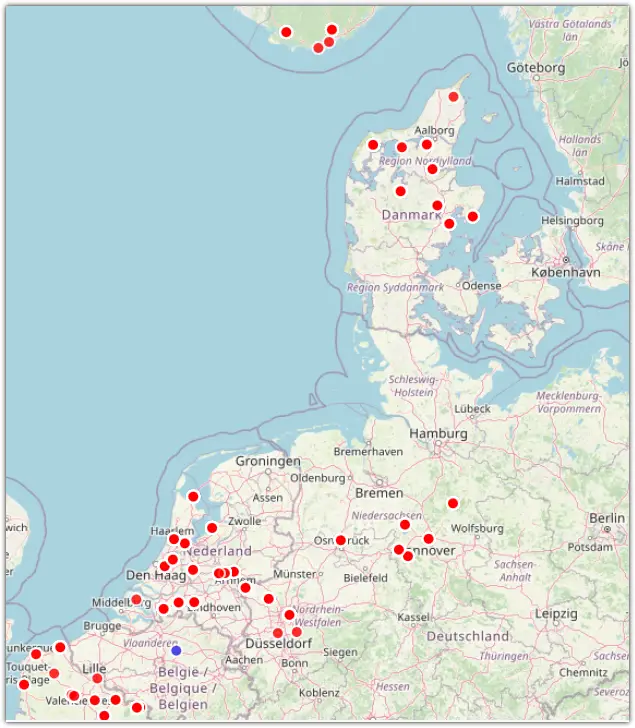
1153 Tropo logs were entered in my fmlist logbook, the furthest distance being 887 km (BBC Radio Scotland, Knockmore on May 14). 210 different stations from 7 countries were received in 2025: BEL, CZE, D, DNK, F, G, HOL.

TROPO LOGS
Click on the image to see my 2025 fmlist tropo logs.

With the free FMLIST DX Log Analyzer you can input your logs downloaded from the fmlist logbook in .csv format and study these logs in tremendous detail.

Top 10 tropo distances
Top 10 distances TROPO 2025

What about all Belgian FMDXers? What did they log? To find out I used DXLog 3.0.
Use your fmlist credentials to log in.
10 FMDXers entered 3.180 logs. They logged 702 stations from 10 countries: AUT, BEL, CZE, BEL, DNK, E, F, G, HOL, LUX. The furthest log was from Spain on August 18: 1014 km Europa FM from Galar/El Perdón-Bordatxar. As there was lots of Sporadic E towards BEL at the time, this might not have been a TROPO log.

SPORADIC E

My best es logs before 2025 were Lebanon on July 11 2022 and Israel on May 24 2019.
On a glorious and long lasting June 4 2025 however I was able to log Space Radio, Gülüsta on 87.5 MHz and on 92.0 MHz Baku Hit FM both from the Republic of Azerbaijan.
That wasn’t all as recordings revealed 91.90 MHZ Radio Varzesh from the Islamic Republic of Iran.
Details on this blog page (Map).
What else was logged in 2025?
On the OIRT band 160 logs were registered, marking 96 stations from 3 countries (BLR, RUS and UKR).
CCIR produced 3320 log entries. 1525 stations from 42 countries were received: ALB, ALG, AUT, AZE, BIH, BUL, CZE, E, EST, F, FIN, FRO, G, GIB, GRC, HNG, HRV, I, IRL, IRN, ISL, LBY, LTU, LVA, MDA, MKD, MLT, MNE, MRC, NOR, POL, POR, RKS, ROU, RUS, S, SRB, SVK, TUN, TUR, UKR.

es logs
Click on the image to see my 2025 fmlist es logs.
Top 10 furthest and shortest distances es 2025

What about all Belgian logs? On OIRT 6 DXers made 405 logs. 112 stations from 3 countries (BLR, RUS and UKR) were entered.
On CCIR 12 Belgian FMDXers entered 12.039 logs. 2.897 stations from 42 countries were logged: ALB, ALG, AUT, AZE, BIH, BUL, CZE, E, EST, F, FIN, FRO, G, GIB, GRC, HNG, HRV, I, IRL, IRN, ISL, LBY, LTU, LVA, MDA, MKD, MLT, MNE, MRC, NOR, POL, POR, RKS, ROU, RUS, S, SRB, SVK, TUN, TUR, UKR..

Besides logging Iran and Azerbaijan to me 2025 was not a tough DX year but rather a TEF year.
I bought my first portable TEF in November 2024 but I really got into it in 2025.
Owning three portable TEFs and one Headless TEF might be of a bit hobby overkill.
The Headless TEF is connected to my online Webserver.
More about the TEF Logger App on this page and this WIKI.

Just like last year DABDX hasn’t become easy to accomplish. On the contrary as more and more muxes are no longer empty but used by new locals.
Still with great tropo and a good location a lot can be heard.
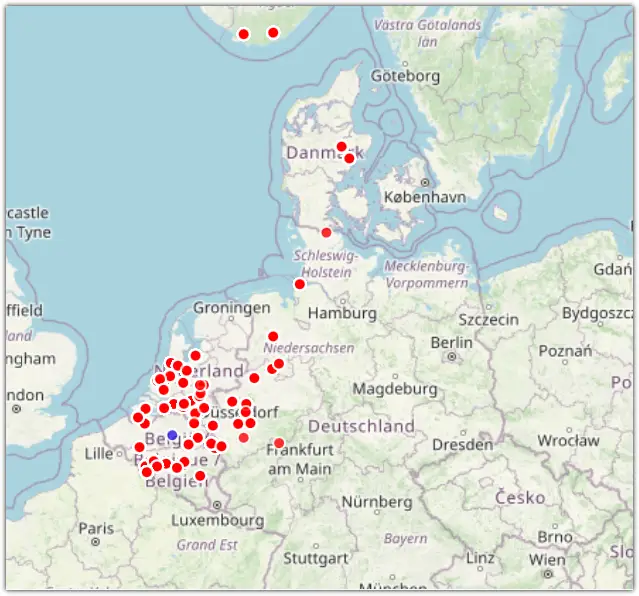
In 2025 I made 457 unique location logs. On October 11 Northern Ireland was received!

DAB logs
Click on the image to see my 2025 fmlist DAB logs

I was also proud to provide some very modest feedback to DAB software developers Clem Schmidt from QIRX, Jan Van Katwijk from Qt-DAB and Petr Kopecký from AbracaDABra.
These tools are really invaluable for serious DAB DX!

Although 2025 wasn’t too bad DXers always hope for more and better DX. Perhaps the gods of the airwaves will bless us with super DX in 2026.